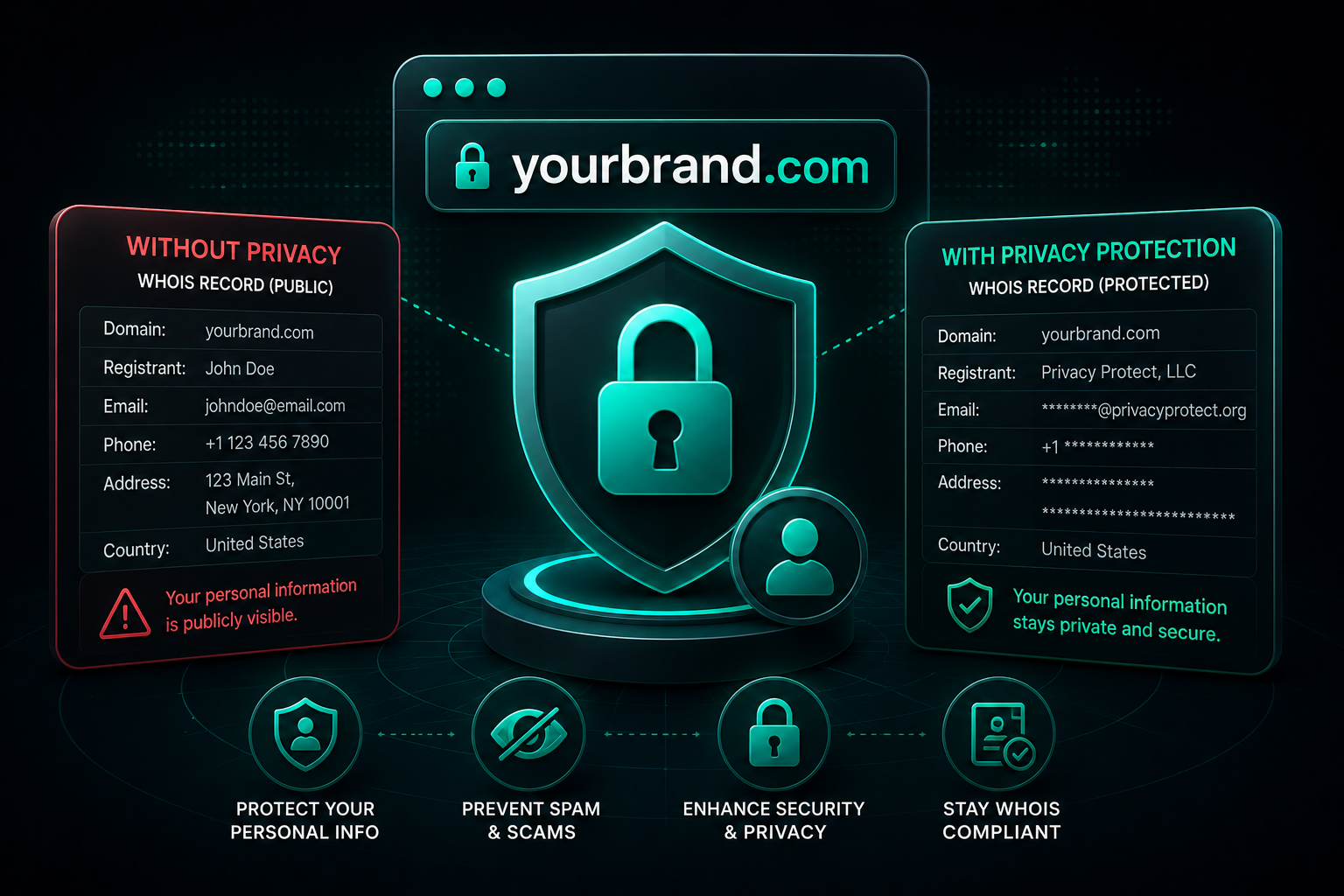
Your Domain Registration Is a Public Record — Unless You Act
When you register a domain name, you're creating a legal record of ownership. ICANN — the organization that governs the global domain name system — requires registrars to collect contact information from every registrant and make it available through a system called WHOIS.
For decades, this data was fully public: anyone could look up any domain and immediately see the owner's full name, email address, phone number, mailing address, and registration dates. In 2026, that system has evolved with GDPR and registrar-level privacy protections, but the underlying risk is still real if you don't take the right steps.
This guide explains exactly what WHOIS is, what privacy protection does, the evolving landscape of domain security beyond just privacy, and how to properly protect a domain from registration day forward.
Understanding WHOIS: The Global Domain Registry
WHOIS is a query-response protocol that allows anyone to retrieve information about a domain registration. Originally designed for network administrators who needed to identify domain owners for technical troubleshooting, WHOIS became a public database of domain owner contact information.
For a standard domain registration without privacy protection, a WHOIS lookup reveals:
- ›Registrant name and organization — your full name or business name
- ›Email address — your actual contact email
- ›Phone number — your direct phone number
- ›Mailing address — your physical street address
- ›Registration date — when the domain was first registered
- ›Expiration date — when the domain registration expires
- ›Registrar information — which registrar holds the registration
- ›Name servers — where the domain's DNS is hosted
This information is stored in a publicly queryable database accessible to anyone — no authentication, no account required. Tools like whois.domaintools.com, who.is, and command-line WHOIS tools can retrieve it instantly.
The Privacy Risks of Exposed WHOIS Data
Without privacy protection, here's what actually happens within hours to days of registering a new domain:
Automated email harvesting. Spam bots continuously crawl WHOIS databases and newly registered domain feeds. Your email address is harvested and added to spam lists within hours of registration. Expect an immediate surge in unsolicited marketing emails, phishing attempts, and sales outreach from domain-related services.
Phone spam and telemarketing. Your phone number from the WHOIS record is sold to telemarketers, SEO agencies, web design firms, and assorted businesses targeting new domain registrants. This is an industry unto itself — companies pay for lists of fresh domain registrations and cold-call them to sell services.
Social engineering attacks. Your WHOIS data gives attackers your full name, organization, email, and phone number. This is enough to construct convincing phishing attacks ("Your domain expires soon — click here to renew") and social engineering attempts designed to steal domain access credentials.
Competitor intelligence. Business competitors can see exactly who owns domains, when registrations expire (creating poaching opportunities), and what domains you've registered (revealing your strategic plans, product names in development, etc.).
Domain hijacking attempts. Armed with your contact information from WHOIS, attackers can attempt social engineering attacks against your registrar's customer support — trying to convince support agents to transfer your domain to an attacker-controlled account. This type of attack (social engineering at the registrar level) has stolen high-value domains from legitimate owners.
Physical security concerns. Your home or office address in a public database creates real-world privacy risks, particularly for domains associated with controversial topics, public figures, or businesses in contentious industries.
How Domain Privacy Protection Works
Domain privacy protection — also called WHOIS privacy, privacy guard, or domain guard — replaces your personal contact details in the public WHOIS record with contact information belonging to a proxy service operated by your registrar or a third-party privacy provider.
When someone looks up your domain's WHOIS record with privacy protection enabled, they see something like:
- ›Name: "Privacy Protected"
- ›Organization: "Registrar Privacy Service"
- ›Email: a proxy address (e.g., abc123@privacyprotect.net)
- ›Phone: the privacy provider's generic phone number
- ›Address: the privacy provider's mailing address
Your real contact information is stored by the registrar but is not exposed in the public database. Legitimate contacts — legal notices, transfer requests, domain-related business inquiries — are forwarded through the proxy to your actual email.
Critically: privacy protection does not affect your legal ownership of the domain. ICANN's policies require that registrars maintain your actual contact information on file. The privacy proxy simply shields it from public view.
RDAP: The Modern Replacement for WHOIS
In 2026, the domain industry has been transitioning from the legacy WHOIS protocol to a newer system called RDAP (Registration Data Access Protocol). RDAP is more structured, more secure, and better suited to modern privacy requirements.
RDAP provides the same domain registration information as WHOIS but with:
- ›Structured JSON responses instead of free-text
- ›Better internationalization for non-ASCII characters
- ›Rate limiting and authentication capabilities
- ›Differentiated access levels (what data is visible to the public vs. authenticated operators)
For most registrants, the practical difference is minimal — privacy protection still works the same way under RDAP. What changes is that RDAP makes it easier for registrars to provide differentiated data access: full contact details to accredited parties (law enforcement, trademark holders) while maintaining privacy protection for general public lookups.
Our domain availability checker uses RDAP data directly for real-time availability checking — meaning the availability status you see is live data, not stale cache from days ago.
Is Domain Privacy Always Free?
This varies significantly by registrar, and it's worth knowing the landscape before you register:
Free with most modern registrars:
- ›Cloudflare Registrar — free privacy on all registrations
- ›Porkbun — free privacy included
- ›Namecheap — free WhoisGuard for life
- ›Hostinger — free WHOIS privacy included on most domain registrations
Historically paid, now more competitive:
- ›GoDaddy — historically charged $10–$15/year for privacy protection, has adjusted pricing under competitive pressure but still typically charges extra
- ›Network Solutions — charges for privacy add-ons
- ›Register.com — charges for privacy
The recommendation: There is no good reason to pay extra for domain privacy protection in 2026. Registrars that include it free are not inferior — they're simply more competitive. When comparing registrars, privacy protection should be included, not an upsell.
GDPR's Impact on WHOIS Data
The EU's General Data Protection Regulation (GDPR), which took effect in May 2018, fundamentally changed WHOIS for European registrants and had global ripple effects.
Under GDPR, personal data of EU residents cannot be freely published without explicit consent. ICANN and registrars scrambled to comply, resulting in:
- ›EU registrant data being withheld from public WHOIS by default
- ›Non-EU registrants still exposed unless they opt into privacy protection
- ›ICANN developing a tiered access model (SSAD — System for Standardized Access/Disclosure) to allow legitimate parties (law enforcement, trademark holders) to access full registration data
The practical implication: if you're an EU resident, GDPR provides you significant default protection. If you're outside the EU, don't assume GDPR protects you automatically — explicitly enable privacy protection through your registrar.
Beyond Privacy: Comprehensive Domain Security
Privacy protection shields your contact information, but domain security goes further. Your domain name is a critical business asset — for many companies, it's their most valuable online property. Losing control of it to a hijacker, DNS attacker, or expired renewal can be catastrophic.
Here's the full domain security stack you should have in place:
### Registrar Lock (Transfer Lock)
Registrar lock is a status flag that prevents unauthorized domain transfers to another registrar. With transfer lock enabled, anyone attempting to transfer your domain to a different registrar will be blocked unless the lock is first disabled through your account.
Most registrars enable transfer lock by default. Verify yours is on. Don't disable it unless you're actively initiating a legitimate transfer — and re-enable it immediately after.
### Two-Factor Authentication on Your Registrar Account
Your domain is only as secure as your registrar account. If an attacker gains access to your registrar account (through password breach, phishing, or credential stuffing), they can modify DNS records, disable transfer lock, and transfer your domain away.
Enable two-factor authentication (2FA) on your registrar account. Use an authenticator app (Google Authenticator, Authy) rather than SMS-based 2FA — SIM swapping attacks can bypass SMS 2FA.
Use a unique, strong password for your registrar account that you don't use anywhere else.
### DNSSEC (Domain Name System Security Extensions)
DNSSEC adds a cryptographic layer to the DNS lookup process, protecting against DNS spoofing and cache poisoning attacks. Without DNSSEC, an attacker who compromises DNS infrastructure can redirect your domain to a malicious site without modifying your registrar account at all.
With DNSSEC enabled:
- ›DNS records are digitally signed by the domain owner
- ›Resolvers can verify that DNS responses haven't been tampered with
- ›Man-in-the-middle DNS attacks are blocked
Not all registrars support DNSSEC for all TLDs, and the configuration is more complex than a checkbox. For high-value domains (e-commerce sites, financial services, sensitive data), DNSSEC is worth the setup complexity.
### Auto-Renewal and Renewal Reminders
Domain expiration is one of the most common ways businesses accidentally lose their domain. A missed renewal email, an expired credit card on file, a spam filter catching the registrar's reminder — any of these can result in your domain entering the expiration cycle.
Enable auto-renewal for all business-critical domains. Keep a valid payment method on file. Use a dedicated email address for domain registrations (not a personal Gmail) so that renewal notices don't get lost.
Consider registering your primary domain for multiple years (5–10 year registration periods are available) to reduce renewal risk and, as a minor bonus, signal long-term investment to Google's domain age signals.
### Defensive Domain Registration
Register common misspellings, alternative extensions, and brand-adjacent variations of your primary domain — not to build sites on them, but to prevent competitors or bad actors from acquiring them.
Priority defensive registrations:
- ›The .com of your primary domain (if you're on .io or .co)
- ›Common typo variations (missing letters, transposed letters)
- ›Your brand name with hyphenation removed or added
- ›Your brand name on .net if you're on .com
Redirect all defensive registrations to your primary domain with 301 redirects.
### Monitoring Your Domain's Health
Set up monitoring so you're alerted to unexpected changes:
WHOIS change monitoring: Services like DomainTools or HosterStats alert you when your domain's WHOIS record changes — a red flag for unauthorized account access.
DNS change monitoring: Tools like DNSFilter or UptimeRobot can alert you if your domain's DNS records change unexpectedly.
SSL certificate monitoring: Certificate Transparency logs (crt.sh) let you see every SSL certificate ever issued for your domain. If you see a certificate you didn't issue, someone may have compromised your domain.
Expiration monitoring: Calendar alerts 60, 30, and 7 days before domain expiration — in addition to registrar auto-renewal — provide redundancy.
The Domain Security Checklist
Use this as a post-registration security review for every domain you register:
Immediate steps (at registration):
- ›Enable WHOIS privacy protection
- ›Enable registrar lock (transfer lock)
- ›Enable 2FA on your registrar account
- ›Set up auto-renewal with a valid payment method
- ›Verify the email address on file is one you actively monitor
Within the first month:
- ›Configure HTTPS (SSL certificate)
- ›Set up DNS correctly and verify propagation
- ›Register key defensive variations of your domain
- ›Consider DNSSEC for high-value domains
Ongoing maintenance:
- ›Monitor WHOIS and DNS for unexpected changes
- ›Review registrar account security annually
- ›Keep payment methods up to date
- ›Verify auto-renewal is working before each annual renewal cycle
Choosing a Registrar That Takes Security Seriously
Not all registrars are equal on security. When comparing registrars for your next domain registration:
Security features to look for:
- ›Free WHOIS privacy protection included
- ›2FA support (and ideally required or strongly prompted)
- ›Registrar lock enabled by default
- ›DNSSEC support for your TLD
- ›Transparent notification policies for domain changes
Pricing transparency:
- ›Clear first-year vs. renewal pricing (some registrars offer $0.99 first year with $40+ renewals)
- ›No mandatory privacy protection upsell
- ›No forced add-ons at checkout
Hostinger consistently rates well on transparency, includes free privacy protection, and offers competitive pricing across major TLDs. Use our domain checker to find your domain's availability across 16 extensions, then register on whichever platform gives you the best combination of price, security features, and support.
Bottom Line
Domain privacy protection is the minimum level of security every domain registrant should have from day one. It costs nothing at the right registrar, prevents real practical harms (spam, social engineering, competitor intelligence), and has zero downsides.
Beyond privacy, treat your domain like the critical business asset it is: lock it against transfers, secure your registrar account with 2FA, monitor for unexpected changes, and register defensively. A domain you've lost to a hijacker or let expire accidentally can cost enormously more to recover — or may be unrecoverable at any price.